
CONNECTED ALERTS. COORDINATED RESPONSE.
Safety Isn't Just a Button.
It's a System.
Pressing a button doesn’t save lives. Preparedness and the system behind it does.
Navigate360 is proud to introduce its most advanced Emergency Management platform, fully integrated with panic buttons. This new advancement turns a single press into swift, life-saving action—bringing preparedness, response, and reunification together in seconds.
Because the moment everything changes is not the moment to plan.
-2.png "Safety isn't a button. It's a system.")
How Navigate360's Advanced Emergency Management & Panic Buttons are Different
For years, school safety has relied on disconnected tools—panic buttons in one system, plans in another, response managed manually. Each solves part of the problem.
Navigate360 brings preparedness and response together in one connected system—so preparation doesn’t stop when a panic button is pressed. Plans, roles, and critical information are ready in advance, allowing response to begin immediately without confusion or delay.
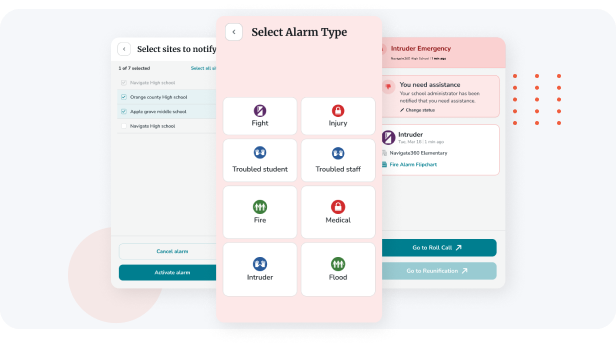
Unlike disconnected tools, Navigate360’s panic buttons are fully integrated into our Emergency Management platform. One press doesn’t just send an alert—it activates a coordinated response across people, buildings, and first responders.
What makes the difference:
- One connected platform for emergency planning, response, and accountability
- Clear ownership and automated decision pathways when seconds matter
- Instant, room-level alerts with precise location context
- Multi-channel notifications to staff, leadership, and responders
- Emergency workflows that activate automatically
- Real-time situational visibility for leadership
No handoffs. No delays. No guessing what happens next.
One Press. One System. One Coordinated Response.
Direct PSAP Notifications: From Classroom to Police Cruiser
When a panic button is pressed, Navigate360 instantly connects classrooms to first responders and Public Safety Answering Points (PSAPs).
- Room-level alerts reach responders immediately
- Two-way communication enables real-time coordination
- Campus-wide alerts keep staff and leadership aligned
Alert From Anywhere
Emergencies don’t wait. Navigate360 lets staff activate help anywhere on campus, even when Wi-Fi connectivity is limited.
- Multiple panic button options ensure coverage in every environment
- Alerts work without Wi-Fi when networks are strained or down
- One system delivers the same coordinated response every time
Total Building Control
During an incident, leaders need visibility and control—not multiple systems. Even off-site or in a responding vehicle, Navigate360 delivers a single, unified command environment with:
- Real-time visibility into alerts and response status
- Interactive maps with room-level detail and access points
- Remote action control, including lockdowns, from any device
Meet Mandates. Exceed Expectations.
Advance system exceeds state and federal safety mandates, including Alyssa’s Law, Kari’s Law, RAY BAUM’s Act, and local emergency management requirements.
- Multi-channel alerting across devices and systems
- Built to exceed state and federal safety requirements
- Aligned with mandates including Alyssa’s Law, Kari’s Law and RAY BAUM’s Act
Know Exactly Where Help Is Needed
New interactive mapping shows exact room-level emergency locations.
- Room-level location accuracy for every alert
- Interactive maps showing spaces, assets, and access points
- Clear situational context for faster, informed response
Wearable Flexibility
Not everyone is same, our new wearable options cover all options:- Multiple wearable options including lanyard, key fob, bracelet, and smartwatch
- Mobile device activation for added flexibility
- Fast, discreet access to help in any situation
“This isn’t another point solution—it’s the moment schools move beyond point solutions altogether. Fragmentation creates risk at the exact moments systems are supposed to protect people, and it quietly drains time and dollars year after year. We’ve spent years connecting preparedness, response, and recovery into one platform—so concerns surface earlier, help arrives faster, and schools aren’t forced to manage crises across disconnected tools when seconds matter."
- JP Guilbault, Navigate360 CEO
See the Difference: Fragmented Vendor Costs vs. Navigate360's Unified Platform
Schools don’t overspend on safety because they buy too much. They overspend because their systems don’t work together. Fragmented vendors increase complexity, create gaps, and drive up total cost.
This comparison shows how Campus360, one of Navigate360’s solution bundles, replaces that fragmentation with a single, unified partner in safety by enabling broader coverage, stronger coordination, and significant cost savings.
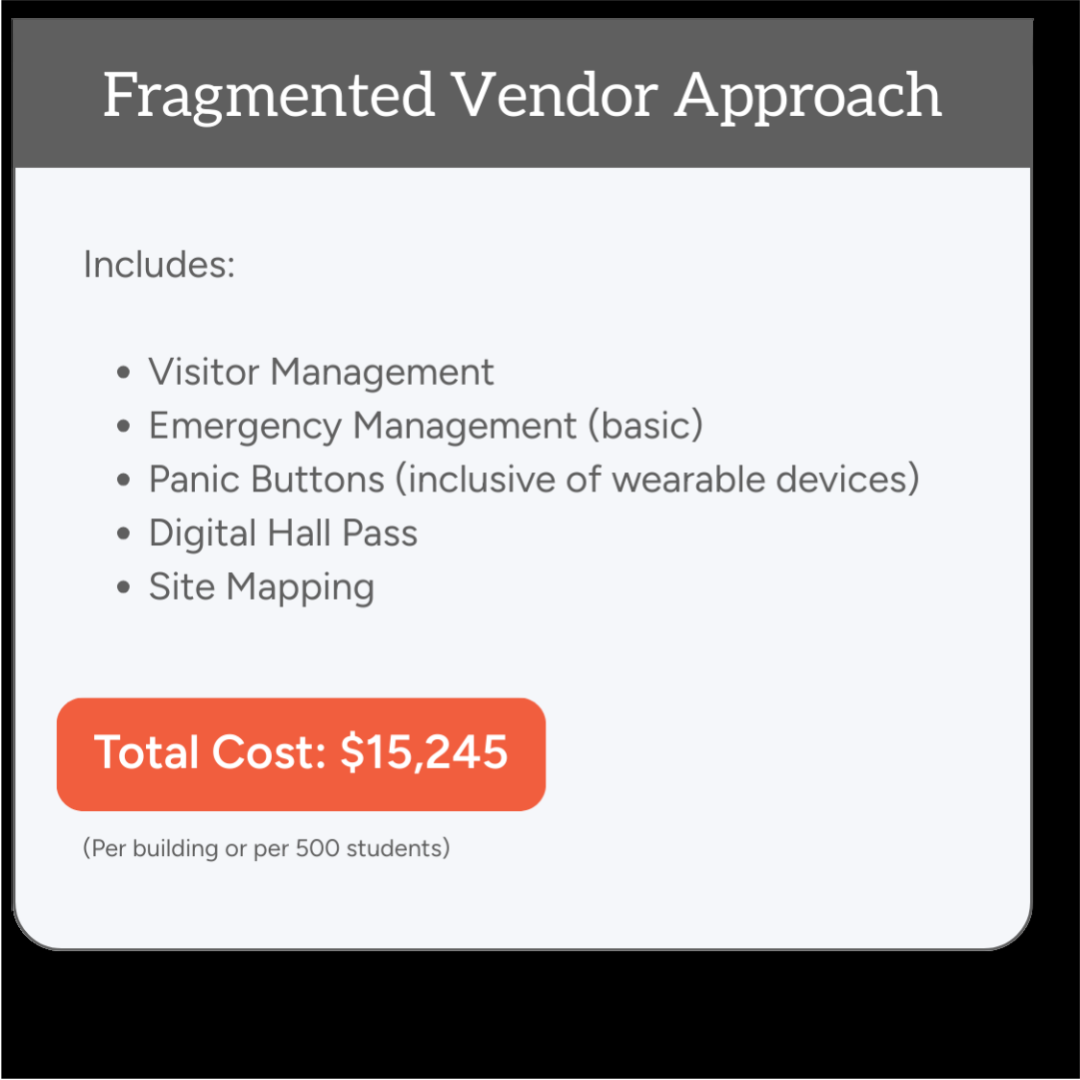
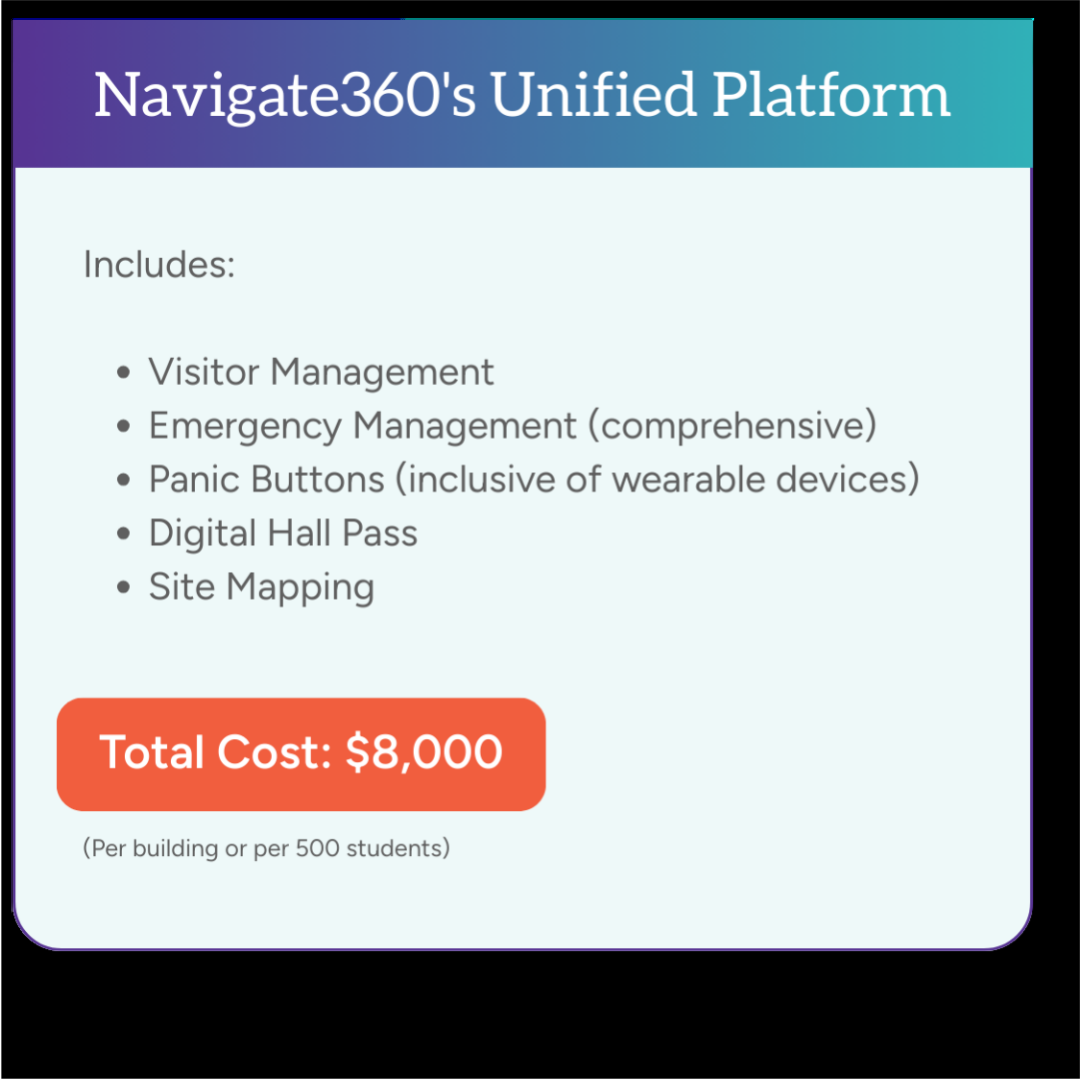
By choosing Navigate360, districts save $7,245, or 48%, while gaining a fully integrated solution that strengthens emergency preparedness and long-term operational efficiency.
School safety requires a proactive, collaborative approach that involves training, tools, and technology. Provided in partnership with 911Cellular, Navigate360's panic buttons and emergency management platform are designed specifically to help Alabama schools respond to and recover from events with speed, precision, and efficiency.
Be Proactive in Protecting Your School Community
Earlier this year, Alabama introduced legislation requiring schools to provide school employees training for and access to a mobile emergency rapid response system. The bill, HB234, requires employees to have a device that links directly to law enforcement to speed the response time in an emergency. If passed, the law becomes effective October 1, 2025, and stipulates compliance by October 1, 2030.
The law is modeled after Alyssa’s Law, already enacted in other states. Alyssa’s Law is named for 14-year-old Alyssa Alhadeff, a victim in the Marjory Stoneman Douglas High School massacre.
